
Device Code Phishing: A Trusted Microsoft Login Misused
Description of Problem
Recently, there has been an uptick in a phishing technique known as device code phishing, where attackers abuse Microsoft’s legitimate device code authentication flow to gain access without stealing passwords or using fake login pages.
Because authentication is completed on a real Microsoft sign‑in page, often with multi‑factor authentication, traditional “spot the fake login page” cues may not apply. When everything looks familiar, users may not realize anything is wrong until access has already been granted.
This makes awareness especially important for organizations that rely on Microsoft 365 and Microsoft Entra ID for authentication. Below, we explain how device code authentication works, how it is misused, and what users and organizations can do to reduce risk.
Device Code Phishing: A Trusted Microsoft Login Misused
Many phishing attacks rely on fake emails and counterfeit login pages. Device code phishing is different and harder to spot because it uses legitimate Microsoft sign‑in pages, real authentication codes, and approved Microsoft login workflows.
Why We are Sharing This
This activity was identified internally by Karan Jaswal of the Kraft Kennedy Security Operations Team, who observed an uptick in Microsoft authentication events consistent with misuse of device code sign‑ins. While these events do not automatically indicate compromise, they highlighted the need for greater awareness around how legitimate Microsoft login processes can be abused when the context is unexpected.
What Is Device Code Authentication in Microsoft?
Microsoft device code authentication is designed for situations where typing full credentials is impractical, such as conference room systems, printers, command‑line tools, or certain applications.
Instead of entering a username and password directly, the device provides a short code. The user goes to a Microsoft login page, such as microsoft.com/devicelogin, enters the code, and completes sign‑in using their normal credentials and multi‑factor authentication. Once approved, Microsoft associates that device or application with the user account.
This is a legitimate and widely used feature in Microsoft environments.
How Device Code Phishing Abuses This
In a device code phishing scenario, someone else initiates the Microsoft device login process and obtains a real device code. That code is then sent to a user through email or chat with a convincing message, such as a meeting request or security prompt.
If the user enters the code and completes sign‑in, they are not approving their own device. They are approving access that belongs to someone else.
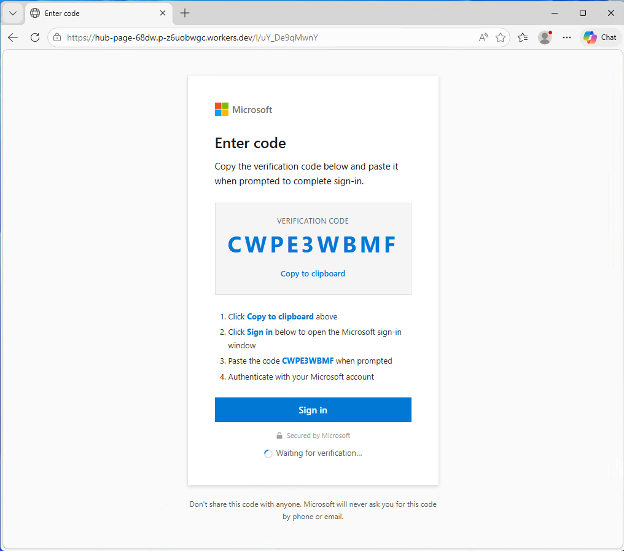
Example: A user gets e-mail directing to download a file.
Link opens a fake Microsoft branded website; however the URL shows differently:
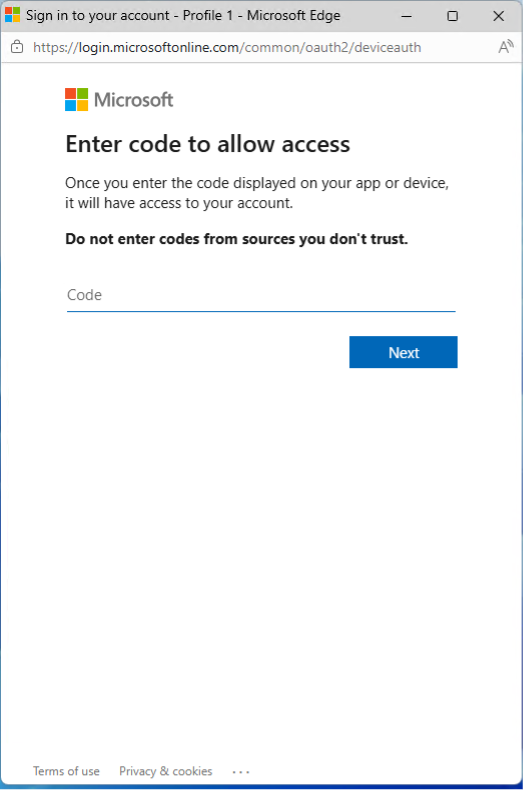
Legitimate Microsoft Login Page Appears after user clicks Sign In:
User enters code supplied in first screenshot, then they are prompted to logon:
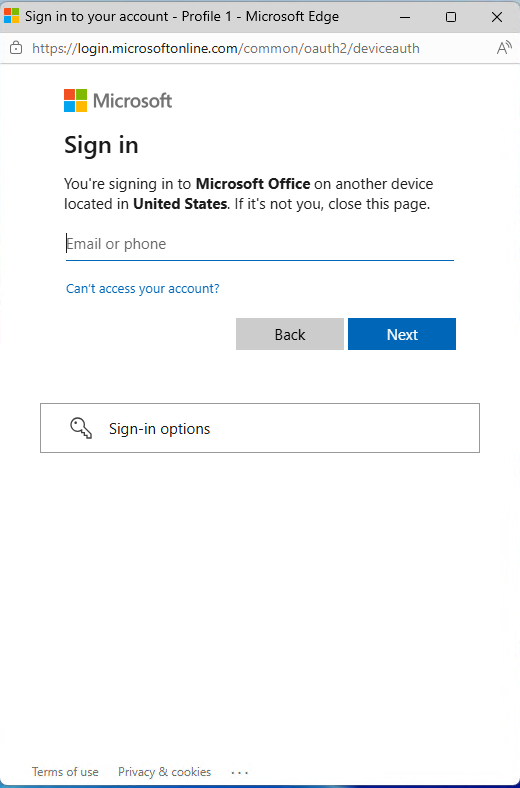
No fake website is used. No password is stolen. Multi‑factor authentication may still succeed. The approval itself is what creates the risk.
Why This Is Difficult to Detect
Device code phishing bypasses many warning signs users are trained to look for:
- The Microsoft login page is legitimate
- The authentication code is real
- There is no suspicious link or fake portal
- Multi‑factor authentication functions normally
From a user perspective, everything appears routine. From a security perspective, unauthorized access may already be established until the authorization is revoked or expires.
Warning Signs to Watch For
Even when the Microsoft sign‑in page is legitimate, the context matters. Red flags include:
- Being asked to enter a Microsoft device code you were not expecting
- Urgent or unexpected approval requests
- Messages claiming you need to verify, reauthorize, or fix something without prior notice
- Device codes sent via email or chat when you did not initiate a login
Microsoft does not typically send unsolicited device codes and ask users to complete authentication without a clear, expected reason.
What Users Should Do
If something feels out of context, pause and verify before proceeding. Do not approve an unexpected Microsoft device code without confirming the request through a known and trusted channel. When in doubt, report the activity to the Kraft Kennedy SOC.
How Kraft Kennedy Helps
The Kraft Kennedy SOC actively monitors Microsoft‑based environments for unusual sign‑in behavior, unexpected device registrations, and other indicators that suggest misuse of legitimate authentication features. Awareness combined with monitoring helps reduce the risk of these events becoming full account compromises.