
Why Microsoft 365 Copilot Isn’t Your Coworker: It’s Your Most Valuable Legal Collaborator
Artificial intelligence has quickly become part of our everyday vocabulary.
We talk about AI assistants and AI agents, and increasingly, about AI coworkers. Tools like Microsoft 365 Copilot are no longer limited to answering isolated questions or generating first drafts of legal filings or emails. Instead, they can move work forward across those emails, meetings, files, calendars, and across business processes within law firms.
But, in legal and professional services environments, the “coworker” label can also create the wrong expectation. Copilot is not a person sitting beside you with independent judgment, institutional memory, or professional accountability. Instead, it is your new virtual collaborator, extending your capacity, surfacing context, organizing information, and executing well-defined tasks while keeping a law firm running.
Today, we are sharing a new, in-depth video from Kraft Kennedy’s CIO Marcus Bluestein and SPG Support Specialist Colby Sawyer, as they dig into the newer agentic experience that can plan and execute multi-step work, Copilot Cowork.
Copilot’s Cowork and explain why adoption should be measured by workflow improvement, not just usage.
What People Get Wrong About Microsoft Copilot
One of the most common misunderstandings about Copilot is that value comes from asking better one-off questions. That is certainly part of the tool’s quick wins, but the more meaningful opportunity a user hasis learning how to delegate outcomes instead of simply requesting answers and using copy, paste, and moving on to the next task.
If firms treat Copilot as a novelty chatbot, adoption will stay shallow. If they treat it as a collaborator that can be instructed, reviewed, corrected, and improved, they begin to unlock more durable productivity gains.
The Coworker Dashboard Concept
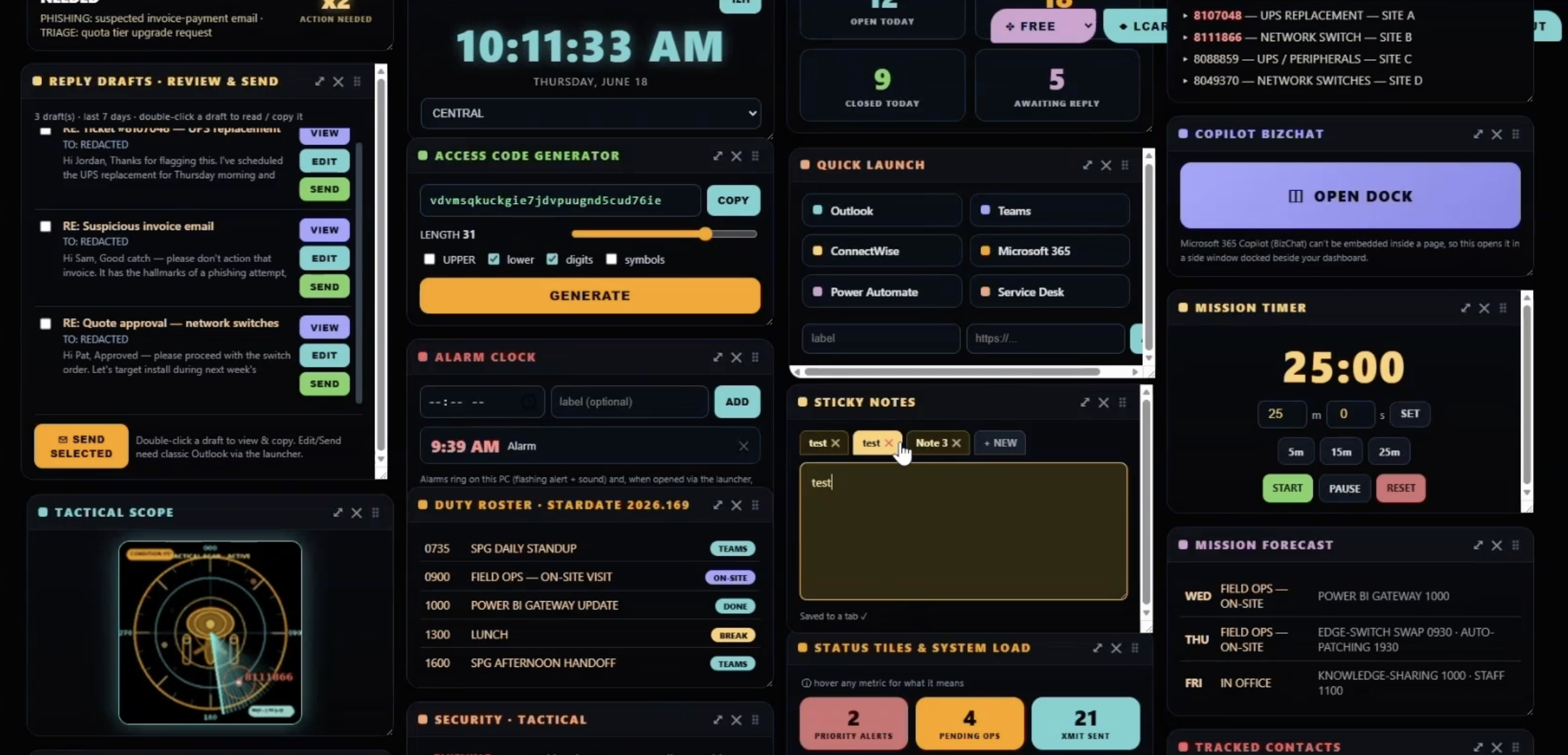
The clearest example in the above video came from Colby’s demonstration of a personalized Copilot Cowork dashboard. He began with a simple idea: build a command center based on Microsoft 365 data. From there, his dashboard evolved into a role-specific workspace that displayed calendar events, inbox items, action items, unread chats, priority tickets, and other daily work signals in one place.
This dashboard was not just functional; it is personal. Colby built the dashboard through conversational prompting, without writing a single line of code. When the sticky notes feature created friction by saving notes directly to Outlook, Colby worked with Copilot Cowork to adjust the design and add multiple note tabs. When the workflow became complex, Colby asked Copilot to generate a single aggregated prompt that could recreate the dashboard for another user.
This is the real lesson: the dashboard represents a shift from treating AI as a tool to managing it like a digital teammate. A user sets direction, refines the outcome, identifies gaps, and then decides what is useful. Copilot contributes speed, structure, and execution, but the human remains responsible for quality.
Microsoft’s own direction reinforces this shift. Microsoft 365 Copilot Cowork is described as a way to turn intent into action across Microsoft 365, with plans, checkpoints, clarifications, and approval before changes are applied. This model is especially relevant for legal organizations, where efficiency must be balanced with confidentiality, accuracy, governance, and professional accountability.
Practical Lessons for Legal and Professional Services Firms
For law firms and professional services organizations, the practical lesson is not to unleash AI everywhere at once. It is to start with clear, bounded workflows where Copilot can help people manage complexity without creating unnecessary risk.
There is also a cultural lesson to be applied here: the strongest users will not be the people who memorize the most prompts. They will be the people who can describe the work clearly, evaluate the result critically, and iterate thoughtfully. The AI software training that’s coming down the road looks more like workflow coaching.
The Copilot Cowork dashboard example shows what that partnership can look like. A user identifies a real pain point, asks Copilot to build toward an outcome, refines the experience, works around limitations, and shares the resulting prompt so others can benefit. That is not passive usage: it is active collaboration.
For firms trying to move from AI curiosity to AI value, this is the model to follow. Start with the work. Define the outcome. Keep humans in control. Measure whether workflows are improving. And teach people to manage Microsoft Copilot not as magic, not as a replacement, but as a capable digital collaborator that helps professionals spend more time on the work only they can do.

Stay Connected
Looking for more ways to interact with Kraft Kennedy?
Check out our upcoming events!